Your work matters. Claude makes it go further.
Every role at iRESTORE exists for one reason — helping people feel confident in how they look. Claude gives you leverage to do that better. Research a product trend in minutes. Draft a supplier negotiation email that's tight on the first pass. Analyze customer feedback patterns without digging through spreadsheets.
Claude has three escalating layers. Chat handles thinking — drafting, research, analysis. Cowork handles doing — persistent projects, file operations, connected tools. Code handles building — actual software, pipelines, integrations.
Every team member at iRESTORE has access to Chat. It covers 80% of what you'll need. Cowork and Code add capability but come with additional risk. Leadership and certain roles will have access to all three tiers. If you think Cowork or Code would be valuable for your work, talk to your manager to request access.
Meet your thinking partner
Why we chose Claude
Anthropic builds AI with safety as the foundation - not an afterthought. That matters when your business handles customer orders and product data.
- Enterprise-grade security - Claude is built for organizations handling sensitive data. Your conversations are private and protected.
- Your data stays yours - encrypted in transit and at rest. Never used to train models. Conversations are not shared across organizations.
- SOC 2 Type II certified - Anthropic is independently audited to verify its security controls work as designed, continuously, over time. Not a one-time checkbox.
- Constitutional AI - Claude is trained to be helpful, harmless, and honest. It will push back on bad ideas and flag when it's uncertain.
Data Privacy - Read This First
Know what's safe to share
Chat - Safe for General Work
Conversations, projects, and artifacts in Claude Chat are covered by your organization's agreement with Anthropic. Use it for drafting, research, analysis, and general business work.
Sensitive Data - Use Caution
Do not share customer PII, order data with personal details, health/device usage data, or proprietary financial information with tools not covered by your data processing agreement. When in doubt, anonymize the data first.
Three Escalating Layers
Thinking, doing, building. Each layer adds capability.
Pick Your Model
Every conversation lets you choose. When in doubt, start with Opus.
Opus
Best for depth- Complex analysis and long documents
- Nuanced writing with specific voice
- Multi-step reasoning and strategy
- Research synthesis
Sonnet
Best for speed- Quick drafts and brainstorming
- Simple questions and lookups
- Formatting and editing
- Everyday tasks
Resources
Training
Internal
- #ai Slack channel - questions, tips, wins
- AI Governance Policy (link to your internal doc)
- Training recordings in Google Drive (People Ops)
Get Help
- Ask in your AI channel for team-specific questions
- Use Claude itself - ask "how do I use Projects?"
- Engineering team for Code track setup issues
We're building the future of at-home beauty technology. Claude helps us move faster, think sharper, and deliver what matters.
What is Chat?
Chat handles thinking and drafting. Single-session, text-in/text-out. This is where most of your team lives today.
You talk to it like a colleague. Ask it to draft an email, brainstorm campaign ideas, analyze data you paste in, or research a topic across the web. It learns your voice and context, so the more you use it, the sharper it gets.
Set it up in three steps below.
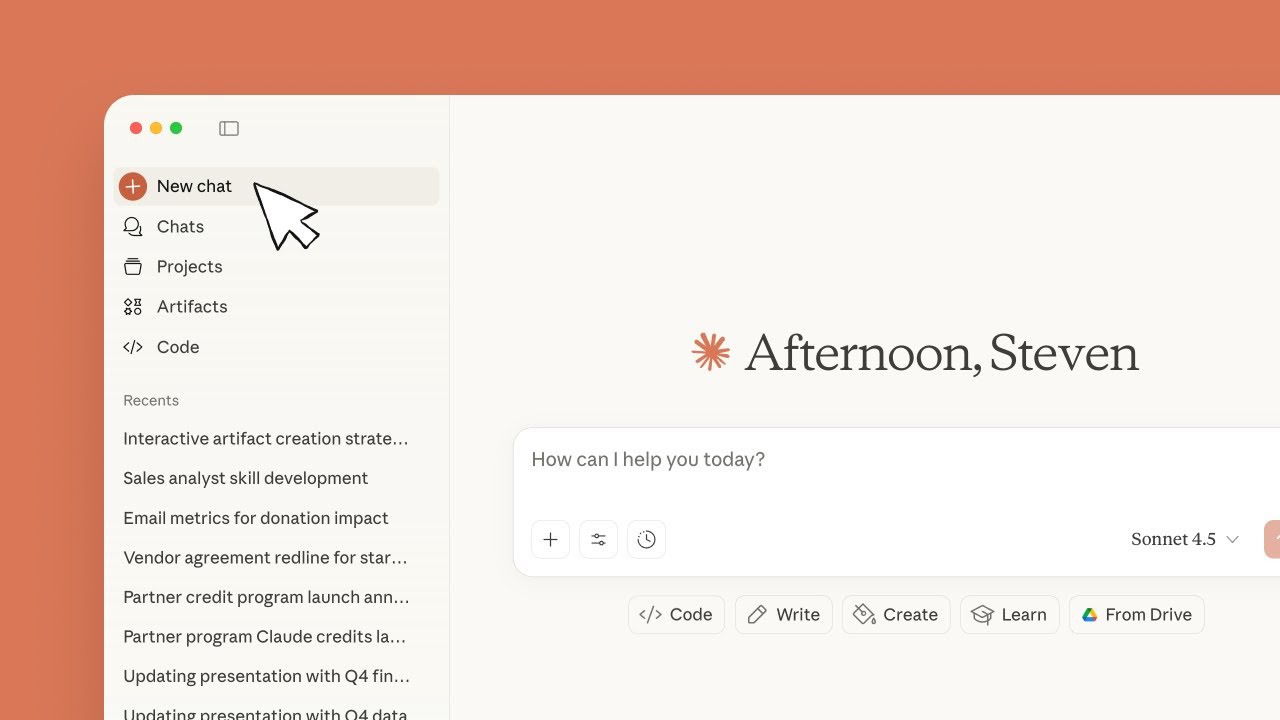
Key Chat Features
These tools make Claude more than a chatbot.
Projects
Persistent workspaces with custom instructions and knowledge files. Create one per major initiative. Everything you upload stays available across conversations.
Deep Research
Claude searches the web, reads dozens of sources, and synthesizes a report. Use for competitor analysis, regulatory research, or any question that needs real data.
Artifacts
Interactive outputs - documents, spreadsheets, diagrams, code. Use when you need something you can edit, download, or share. Skip for quick answers.
Connectors
Connect Claude to Google Calendar, ClickUp, Excel, PowerPoint, and other tools. Pulls in context without manual uploads. Review your data processing agreement before connecting tools with sensitive data. Don't connect anything with sensitive data without approval.
Tips That Apply Everywhere
These patterns make every conversation better, no matter what you're working on.
Start fresh often
Context windows have limits. When you switch topics, start a new conversation. Long threads get noisy and Claude loses focus.
Give context, not keywords
Claude is not a search engine. Include audience, format, tone, and constraints. "Draft a 3-paragraph email to our channel partners declining this proposal because pricing is 30% above budget" beats "vendor email decline."
Verify everything
Claude is confident even when wrong. Double-check numbers, dates, regulatory claims, and anything you'll share externally. Trust but verify.
Iterate, don't restart
If the first response isn't right, give feedback: "Make it shorter," "More formal," "Add the revenue numbers." Claude adjusts within the same conversation.
Use forcing functions
Generic prompts get generic answers. These techniques get better output:
- "Give me 10 options" - Generate many, then cherry-pick. Faster than describing the perfect answer.
- "Play devil's advocate" - Forces Claude to argue against you instead of agreeing.
- "Score this 0-100%" - Have Claude rate sections of your draft, then fix the weak ones.
- "What am I not thinking about?" - Surfaces blind spots you didn't know to ask about.
- "Rewrite this in half the words" - Tighter output than asking to "make it shorter."
- "You're a skeptical customer reading this" - Assigning a role changes the lens. Gets honest feedback.
- "Write something like this but for Q2" - Paste an example. Showing the format beats describing it.
Give Claude Context
The more context Claude has, the better the output. These tools help you share what's on your screen, in your head, or too tedious to type.
📷 Paste screenshots
Hit Cmd+Shift+4 to screenshot anything on your screen, then paste it straight into Claude. Faster than describing a webpage, error message, or document layout.
🎤 Use voice mode
Tap the microphone in Claude and talk instead of typing. Faster for brainstorming, explaining context, and thinking out loud. For even more speed, try Wispr Flow - it transcribes your voice anywhere on your Mac, so you can dictate straight into the Claude input box.
🤖 Prompt Cowboy
A website with a library of ready-made prompts for Claude. Browse by category, copy what fits, and customize from there. Saves you from staring at a blank input box. promptcowboy.ai
📋 Build starter prompts
Before ending a conversation, ask Claude to write a starter prompt that captures the key context, decisions, and next steps. Paste that into a fresh chat and you pick up right where you left off with a clean context window.
Use Cases by Role
Select your function to see tailored ideas. The universal cases work for everyone.
Writing & Drafting
Emails, Slack messages, docs, presentations, proposals. In your voice, with your context.
Research & Analysis
Competitor research, market analysis, policy review, data synthesis. Ask Claude to go deep.
Admin & Ops
Meeting agendas, travel planning, document formatting, process documentation, templates.
Select your role to see tailored use cases and prompt ideas.
Growth & Marketing
- Write campaign briefs and ad copy variations for testing
- Draft SEO content and product landing page copy
- Analyze competitor positioning — HairMax, Capillus, CurrentBody
- Build social media content calendars for product launches
- Performance creative briefs from campaign data
B2B Sales
- Research salon and clinic prospects before outreach
- Draft personalized outreach emails for B2B partners
- Prep for QVC and retail pitch meetings
- Write proposals for salon/clinic device partnerships
- Summarize sales call notes into action items
Product Development
- Write product specs and requirements from rough notes
- Competitive device feature comparison matrices
- Synthesize customer feedback into product themes
- Draft product launch readiness checklists
- Research regulatory requirements for new device categories
Operations & Supply Chain
- Process documentation and SOP creation
- Supplier evaluation and comparison matrices
- Inventory forecasting model inputs and analysis
- Logistics optimization — 3PL evaluation, shipping routes
- ERP workflow documentation and Fulfil.io process guides
Customer Experience
- Analyze support ticket patterns and root causes
- Draft customer FAQ and knowledge base articles
- Build response templates for common device questions
- Summarize CSAT and NPS trends into action items
- Create customer onboarding guides for new devices
Finance
- Financial modeling and scenario analysis
- Variance analysis and narrative writing
- Budget preparation and EBITDA forecasting
- Margin analysis by channel — DTC, Amazon, wholesale
- Audit support and compliance documentation
People Ops / Chief of Staff
- Write job descriptions from role requirements
- Build structured interview guides and scorecards
- Draft policy documents and handbook updates
- Onboarding checklists and new hire materials
- Performance review templates and guidance
Data & Analytics
- Build dashboards and KPI scorecards from raw data
- Analyze channel performance — DTC, Amazon, wholesale
- Customer cohort analysis and LTV modeling
- Inventory and demand forecasting models
- Ad spend attribution and ROAS analysis
CRO
- Analyze conversion funnel drop-off points
- Draft A/B test hypotheses from site analytics
- Landing page copy variations for testing
- Review checkout flow UX and suggest improvements
- Summarize test results and recommend next experiments
Leadership
- Strategic analysis and decision frameworks
- Board and investor prep — decks, memos, talking points
- Company-wide announcements and messaging
- Market research and beauty industry trend synthesis
- Operational review prep and KPI dashboards
Your Profile
Tell Claude who you are and how you work.
Tell Claude who you are and how you work. We'll generate a personal profile you can paste into Claude's settings.
Who You Are
How Claude Should Work
Your Writing Voice
Paste 4-7 examples of your real writing. When you ask Claude to write a Slack post, email, or message for you, it will reference these samples to match your voice.
- A wins post or team shoutout (Slack)
- Feedback to a direct report or teammate
- An email to a vendor or partner
- An email to a customer or prospect
- A summary or status update
- A quick approval, decline, or decision
- Copy you've written (marketing, product, internal)
Copy this prompt into a chat with ChatGPT or Gemini
This tells your current AI to export everything it knows about your professional context. Work context only
Paste the results below
Copy ChatGPT or Gemini's response and paste it here. This will be combined with your answers into one profile block for Claude.
Review this and make it yours. Click the text above to edit - add context about your team, current projects, or how you prefer to work.
While you're in Settings, go to Capabilities and turn on all three:
- Memory
- Search across chats
- Code execution
Under Tool access, select Load tools when needed.
Try It Out
Open Claude and try something real.
Your preferences are already loaded. Start a conversation and see your voice come through.
Claude will ask you a few questions, then draft the message in your voice. That's your preferences working.
Once you're happy with it, paste it in #ai. If the tone feels off, tell Claude: "Make it more direct/casual/concise." It adjusts.
Company Project
Give Claude deep context about your company.
In the Claude app, click Projects in the left sidebar. Click + New Project. Name it iRESTORE. Under visibility, select Private.
Download these two files. Open your iRESTORE project, find Project knowledge below the project name, and click Add content to upload both.
Try something new
Paste one of these into Claude Chat and see what comes back.
Draft a response to a customer asking about the difference between the iRESTORE Professional and Elite devices.
What is Cowork?
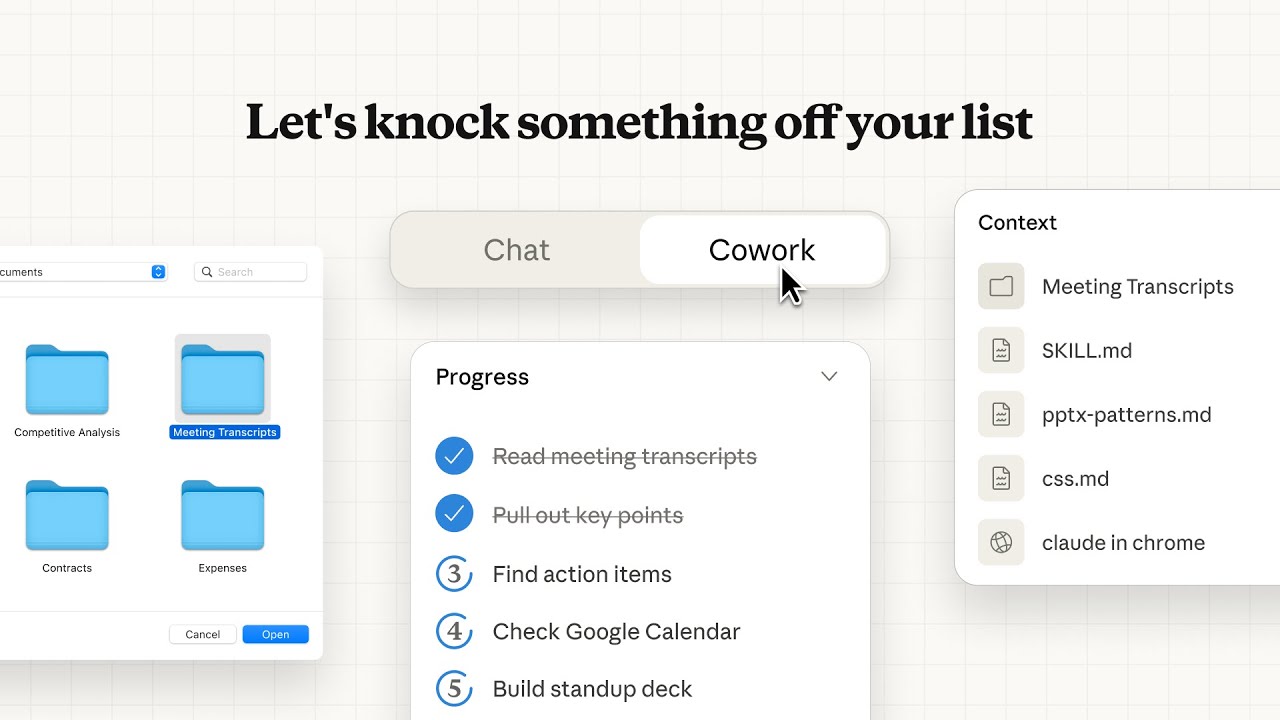
Cowork is the desktop app's project mode. You give Claude access to a folder on your computer and it works independently - reading and editing files, connecting to Google Calendar and Drive, browsing the web, and producing real deliverables like spreadsheets, reports, and dashboards.
Best for: Operations, marketing, finance, and anyone who works with documents, data, or repetitive knowledge work. No technical background needed.
Cowork: Claude Works on Your Files
What You Can Do With It
Calendar Audit
Claude pulls 3 months of Google Calendar data, categorizes your meetings, and shows where you're overcommitted. Takes about 2 minutes.
Data Dashboard
Drop an Excel file and ask for a dashboard. Claude builds an interactive HTML report with charts you can share with your team.
Marketing Report
Connect to your analytics and Claude builds a performance summary. Open rates, pipeline numbers, campaign ROI - formatted and ready to present.
Downloads Cleanup
Point Claude at your Downloads folder and it organizes files by type, finds duplicates, and flags anything older than 90 days for cleanup.
Ready to try it?
Cowork reads and edits files on your computer, connects to tools like Google Calendar and Drive, and runs tasks independently. That power comes with some risk, so access requires manager approval.
Chat with your manager about getting access. If you've already completed the Chat track, mention that - it helps.
What is Claude Code?
Claude Code is an AI pair programmer that lives in your terminal. It reads your codebase, writes code, runs tests, and ships pull requests. You describe what you want built and it handles the implementation - editing files, running commands, and managing git workflows directly on your machine.
Best for: Engineering and technical team members who write or maintain code. You don't need to be a developer, but you do need to be curious.
Want 1-on-1 help getting started? Ask in your team's AI channel and someone will walk you through it.
Code: Claude as Your Pair Programmer

What the Team Has Built
Focus Tab
Chrome extension for tracking focused work time. Built and deployed entirely with Claude Code. View it live
This Onboarding Page
The page you're reading right now was built and is maintained using Claude Code. Every feature, test, and deploy goes through it.
Internal Tools
Scoreboards, brand guides, FAQ bots - the tools on Dream Team are built with Claude Code handling everything from architecture to deployment.
Ready to try it?
Claude Code writes real code, creates branches, and opens pull requests in production repos. It's powerful, and mistakes push to real systems, so access requires manager approval.
Chat with your manager about getting access. Prior experience with the Chat and Cowork tracks helps your case.